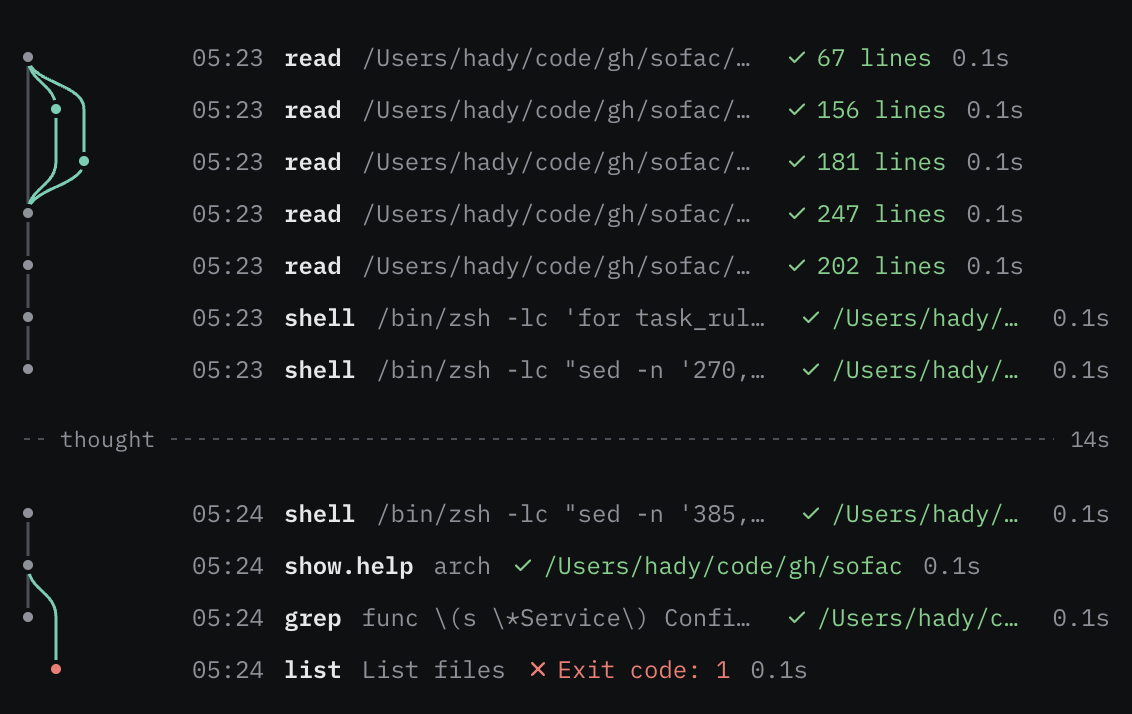
This is Orven's way of communicating that some of these tool calls were executed in parallel.
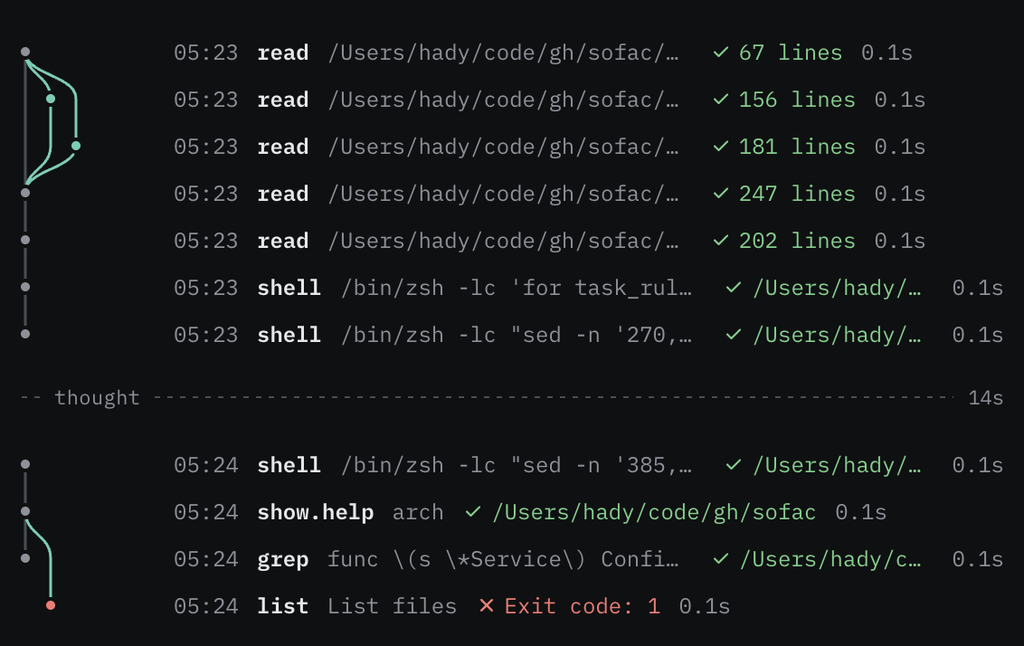
There's nothing particularly special about this, well, maybe it's slightly unique, but it's nothing to stop the presses over. I'm trying to recall if I had seen this before or not, but experiencing the same non-descriptive UI language elsewhere in AI-centered tools has frustrated me enough to put my energy into figuring out many such details in Orven's UI. So let's talk details.
Purpose
You know when they describe some kind of activity and you sit back and ask yourself, but why? Only you weren't asking yourself, you blurted this out loud, perfectly acceptable social behavior right there. Nonetheless, someone comes to the defense of said activity and says, "Because it's fun, there's no purpose!"
Fun UIs don't help you get things done. It's heart-wrenching because I love fun UIs, I love fun things just as much as the next person, I hope. But the problem in my anecdotal experience around discussions involving "fun UIs" is they stop short of the actual purpose a user interface is supposed to serve. It's an interface for the user, to do what you might ask? To get. the. job. done.
If your animation takes half a second between mouseup and settling, then I'm afraid I have news for you, your fun is many people's annoyance.
But listen, you get the point now. We've slandered fun enough already. I guess the message you're thinking now is, don't build fun things? No. Build useful things.
Each row in Orven's activity log is one tool call. It shows the time, the tool, its arguments, the result and how long the call took. The line on the left is the agent's timeline. When the agent sends several calls at once, the line splits into branches that start from the same dot and join back up once every call in the group has returned. In the screenshot, the first few reads went out together. Further down, a list call failed, so its branch ends in a red dot and never rejoins the line.
Most agent tools I've used print tool calls as a flat list. Every call gets its own row whether it ran alongside others or not, so you can't tell whether the agent waited for one result before asking for the next. Is it stuck on something important, or can you interrupt it and redirect it? Can you take a quick glance and know if the model is in a rut? Well, you sure can on Orven.
Noise
My test for any element on the screen is to take it away and see whether the user lost anything. If they didn't, it doesn't belong there. The branches pass. Take them away and you can no longer tell which calls ran together, or whether the agent is stuck.
The elements that stay have a second test. The first time the UI shows a failure, a tool or a request for permission, the user learns what it looks like and where it appears. If the same thing later shows up in a different form or in a different place, it contradicts what they learned, and they have to stop and work out whether it means something else. That's noise too, even when the element passes the first test.
Examples
Let's see what happens when we behave as though we didn't know that there's some button somewhere in some corner over there because, well, we put it there. What does a user really see?
Take it away
The first mockup starts with the log from the screenshot plus four kinds of element that often end up in logs like it. Each press takes one of them away.
None of the four costs the reader anything. The rows are evenly spaced and the columns line up, so the lines between them can go. After the first row, where a column sits says what it is, so the labels can go too. The tick and the cross, in green and red, already say success and failed. The date is the same on every row, and the last column already says how long each call took.
Everything left after the last step passes the test. Take away the time and you can't line the log up with anything else. Take away the result and you don't know what the call found. Take away the branches and you're back to a flat list.
Keep it consistent
Each element in the next mockup would pass the first test on its own. The rows above the thought show how this log presents a failure, a tool name, a duration and calls that ran together. Below the thought, all four come back in a different form, so the reader has to stop and work out whether they mean something different.
The failed list call gets the red cross the first failure had, because amber reads as something less serious. The shell call stops being called Bash, since a second name makes it look like a second tool. Its duration goes back to seconds with one decimal, so it can be compared with the others without converting it. The two calls that ran together get branches on the timeline, as the first ones did. All four were noise because they contradicted what the log had already shown.
Keep it in one place
Where something appears is part of what the user learns too. If an agent asks for permission under its row in the log once, the user expects the next request there, answered with the same keys. In the first version below, the second request opens a dialog over the log and the third appears as a strip across the top. The keys stop working after the first request, and Allow and Deny swap sides between the second and the third.
With the requests in different places, the user has to read each one as if it were the first, and the swapped buttons make it easy to click the wrong one on a command like rm -rf. In one place, after the first request they already know where to look and which key to press.
Questions to ask yourself
- If you took this element away, what would the user lose?
- Does it say something another element already says, like a word next to an icon that means the same thing?
- Is it the same on every row? Then it can be said once, or not at all.
- Where has the user seen this state or action before, and does it look the same here?
- Does the same thing have the same name, colour and format everywhere it appears?
- Will the next request, error or result appear in the same place as the last one, answered with the same keys?
- What does the first screen teach the user, and does every screen after it keep to that?