On a product I worked on, we added an AI feature for processing the documents users uploaded. It was called intelligent extraction, and the goal was to reduce the data entry users had to do. It never worked as intended, and it gave users more work. Some of the documents had no consistent layout, and getting the right values out of them needed careful reading. Users had to check what the AI had filled in against the document, which meant reading those documents closely anyway.
Other documents did follow a consistent format. For those, deterministic extraction would have pulled the data out reliably. For the rest, a form for users to fill in would have got us closer to the goal of reducing data entry than the AI feature did.
The first part of this series covered what to find out about a process before replacing it, including how its output is checked, how success is measured and what happens when it fails. With those answers you can judge whether AI suits the process. These are the four questions I would ask, and several of them use the baseline from part 1.
Four questions to ask
1. Does checking the output cost less than doing the work?
Someone has to decide whether each AI output is right. Compare the time that takes with the time per item you measured in part 1. If a reviewer needs most of that time to check one output, there is little left to gain, and you have added a step to the process.
Checking is cheap when the output can be tested automatically, as code with good tests can, or when an expert can confirm it at a glance. It is expensive when every part has to be traced back to a source. The inconsistent documents in the extraction feature were in the second group. Checking the extracted values meant reading those documents closely, and that reading was what the feature was supposed to save users from doing.
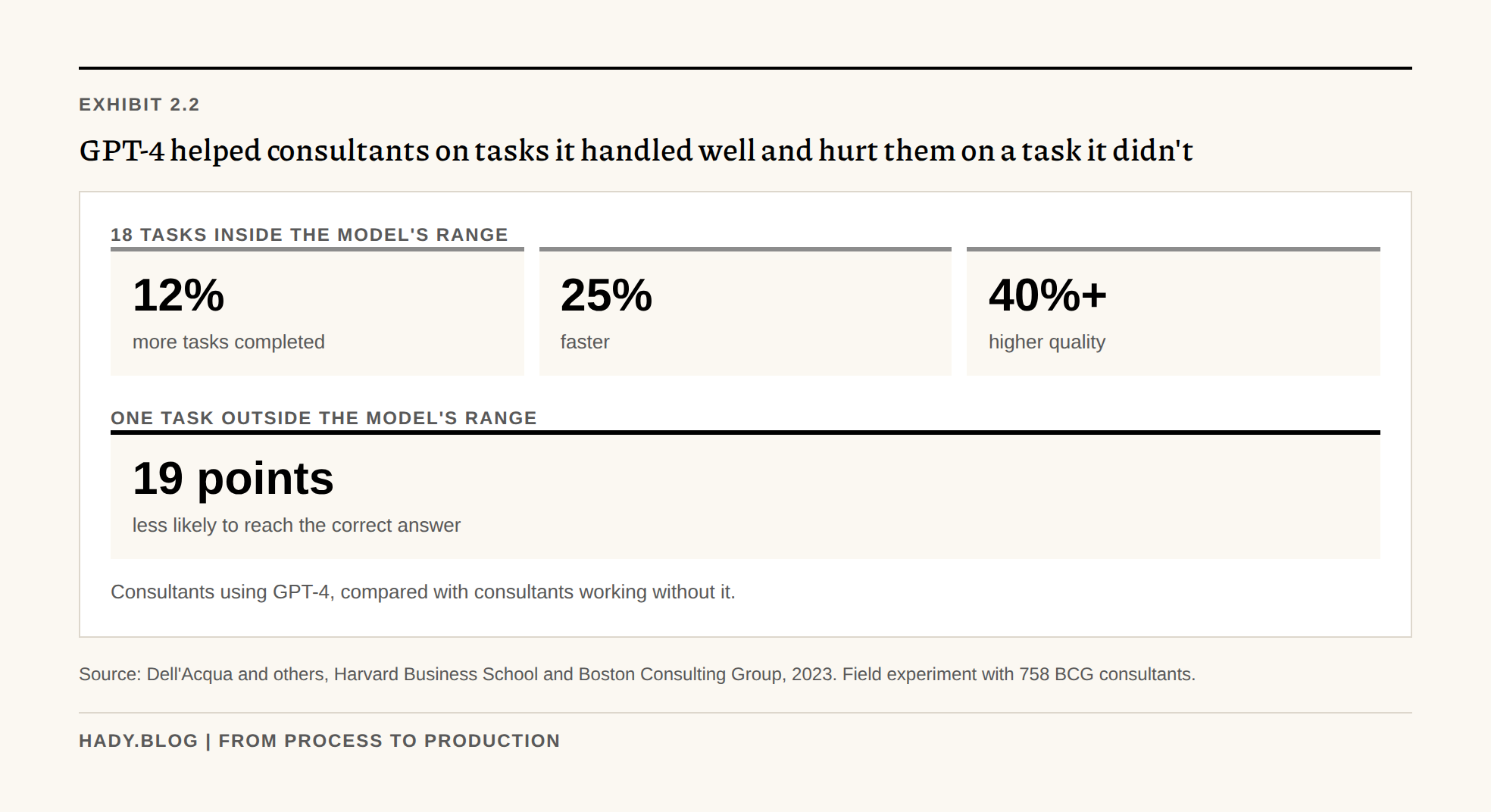
People are also not good at telling when AI output needs a closer look. In a study by Harvard Business School and Boston Consulting Group, 758 BCG consultants worked on realistic consulting tasks, some with GPT-4 and some without. On tasks the model handled well, consultants using it completed 12% more tasks, 25% faster, and their work was rated more than 40% higher in quality. On a task the researchers had designed to fall outside what the model could do well, consultants using it were 19 percentage points less likely to reach the correct answer than those working without it. That is a reason to build the check into the process instead of expecting users to notice when the output is wrong.
Exhibit 2.2
GPT-4 helped consultants on tasks it handled well and hurt them on a task it didn't
18 tasks inside the model's range
One task outside the model's range
Consultants using GPT-4, compared with consultants working without it.
Source: Dell'Acqua and others, Harvard Business School and Boston Consulting Group, 2023. Field experiment with 758 BCG consultants.
2. Is this step the bottleneck?
Trace a few items through the whole process and note where they wait. If most of the waiting happens somewhere other than the step you want to automate, making that step faster will not change how long the whole process takes. Work often waits on approvals, on handoffs between teams, and on information from someone outside the team.
Jeff, from part 1, built a tool to send reminders about overdue client data. In the case that exposed it, the data was late because the client was waiting for Jeff's consultancy to tell them which sites to include. More reminders could not fix a delay that was on the consultancy's side.
3. Does the AI have the information a person uses to decide?
Ask the people who do the work what they look at before they act, and compare that with what the AI can access. People often rely on sources nobody lists, such as email threads, notes about a customer, or something a colleague mentioned on a call.
Jeff's team read the correspondence with each client before chasing. The tool only had the tracking spreadsheet, so it had no way of seeing that the consultancy owed the client an answer. If the AI can't reach the information a decision depends on, connect it to those sources or keep a person in that step.
4. Would something simpler do the job?
Before building an AI feature, check whether a rule, a form, a template, a status field or a database query would work. These are cheaper to build, behave the same way every time, and are easier to test.
Part of the input to the extraction feature was consistent, and deterministic extraction would have handled it reliably. A form would have made the rest easier to enter. I think those two together would have reduced data entry more than the AI feature did.
Volume matters as well. An AI feature needs test cases, monitoring and someone to maintain it when models change. If the task happens rarely, or every case is different, that upkeep can cost more than the work it saves.
Narrowing a use case that fails
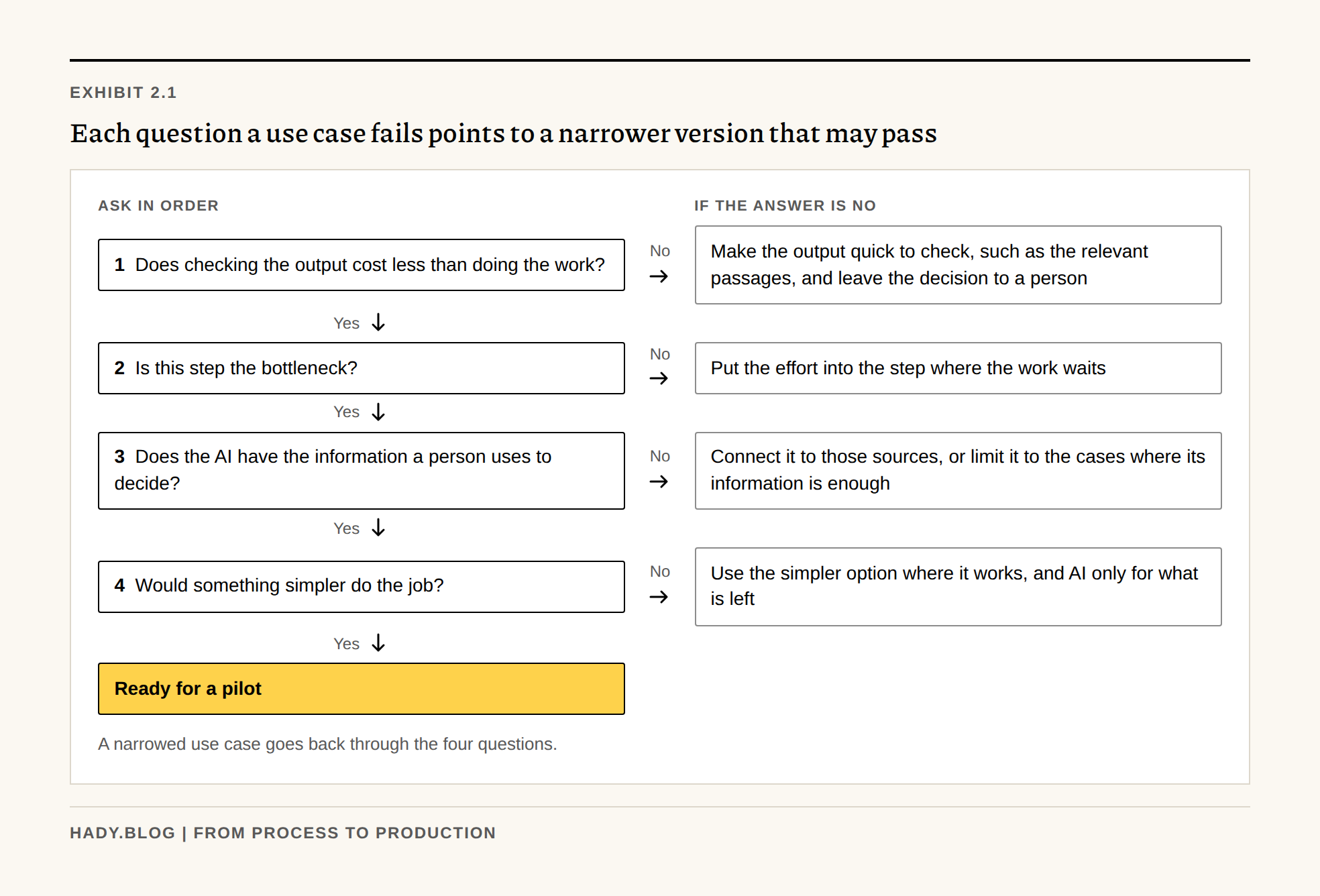
A use case that fails one of these questions can often pass in a narrower form, and the question it fails tells you how to narrow it.
- If checking costs too much, reduce what the AI produces to something quick to check. It can find the relevant passages in a document and leave the decision to a person.
- If the step isn't the bottleneck, put the effort into the step that is.
- If the AI can't see the information people use, connect it to those sources, or limit it to the cases where the information it has is enough.
- If something simpler would work for some cases, use it for those and consider AI only for what is left.
Exhibit 2.1
Each question a use case fails points to a narrower version that may pass
Ask in order
If the answer is no
A narrowed use case goes back through the four questions.
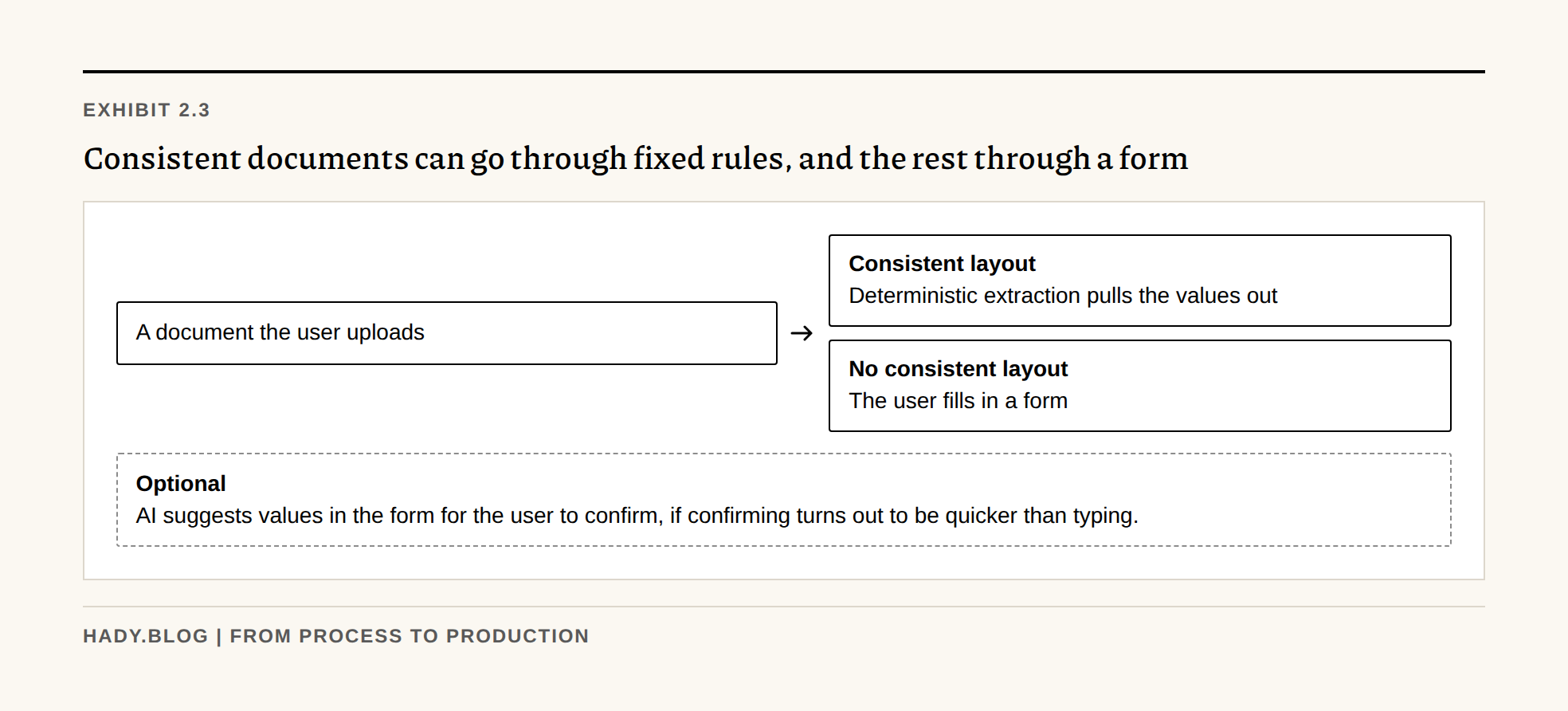
The extraction feature could have been split this way. Consistent documents would go through deterministic extraction. The inconsistent ones would go to a form, possibly with AI suggesting values for a person to confirm, if confirming them turned out to be quicker than typing them.
Exhibit 2.3
Consistent documents can go through fixed rules, and the rest through a form
Deterministic extraction pulls the values out
The user fills in a form
AI suggests values in the form for the user to confirm, if confirming turns out to be quicker than typing.
Checklist before building an AI feature
Work through these before you commit to building an AI feature.
Download the fit assessment worksheet (PDF, one page) to fill in with the people who know the process.
- Time how long it takes to check one AI output, and compare it with the time per item today.
- Find where items wait in the process, and check whether the step you want to automate is one of those places.
- List the information people use to make the decision, and check whether the AI can access all of it.
- Check whether a rule, a form, a template or a query would do the job, and whether the task happens often enough to justify building and maintaining an AI tool.
If a use case passes all four, the next step is a pilot. Part 3 covers how to design one so it can go into production.