After the client's complaint in part 1, Jeff wanted his tool to read the correspondence with each client before sending a reminder. That meant giving it access to the team's inbox, and the project ran into questions the pilot had never had to answer. Client emails would now go to an external AI service, and nobody had checked whether the consultancy's contracts and data policies allowed that. The API keys that connected the tool to the AI service and the mailbox had been shared and stored in ways the security team couldn't accept. The tool had been running on Jeff's own setup, and moving it onto the company's infrastructure meant meeting requirements it was never built for. Jeff had built most of it by prompting an AI coding assistant, and he didn't have the engineering background to rework it to the infrastructure team's requirements.
Jeff is a maker. He gets things built, and organizations should reward people like him. He isn't technical, though, he was still running operations, and this was a technical project. Choosing who leads this kind of work may be the most important decision in an AI project, and I'll come back to it in part 4.
His pilot had shown that the tool could write and send reminders. It had not tested whether the tool could run inside the consultancy's systems under its security and compliance rules, and that is where most of the problems came from.
Exhibit 3.1
Jeff's pilot tested the task, and his problems came from what it left out
Tested in the pilot
Not tested in the pilot
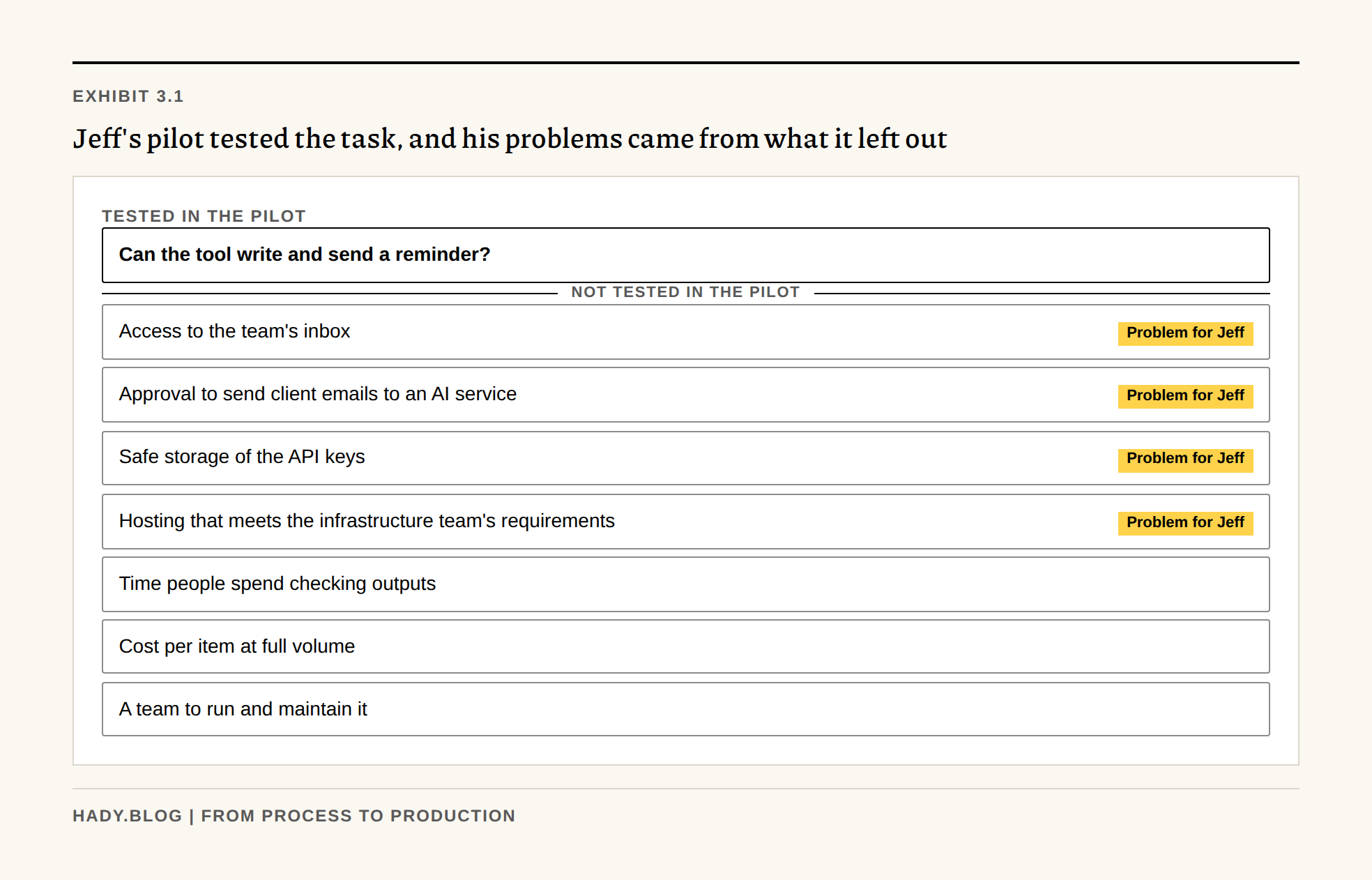
What pilots leave out
Many AI pilots are set up to show that the AI can do the task. They run on a sample of data, outside the company's normal systems, with the person who built the tool checking the results. Access to real data, security and compliance review, the effort of checking outputs, the cost at full volume and a team to run the tool are all left until later.
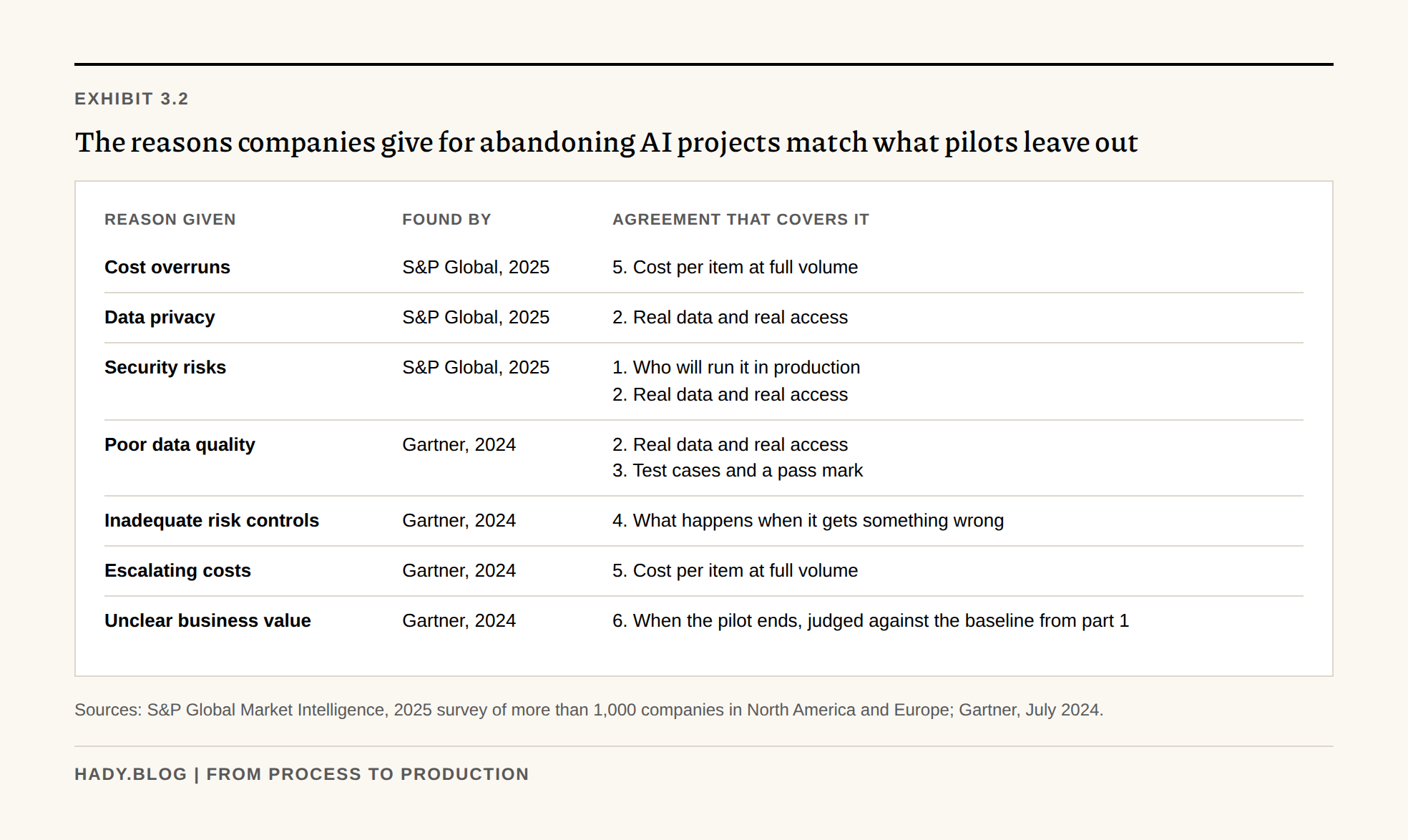
The reasons companies give for abandoning AI projects are mostly on that list. In S&P Global's 2025 survey of more than 1,000 companies, the average organization scrapped 46% of its AI proofs of concept before they reached production, and the main obstacles reported were cost overruns, data privacy and security risks. Gartner predicted in 2024 that at least 30% of generative AI projects would be abandoned after proof of concept by the end of 2025, because of poor data quality, inadequate risk controls, escalating costs or unclear business value. If a pilot leaves these out, a good result tells you little about production.
Exhibit 3.2
The reasons companies give for abandoning AI projects match what pilots leave out
| Reason given | Found by | Agreement that covers it |
|---|---|---|
| Cost overruns | S&P Global, 2025 | 5. Cost per item at full volume |
| Data privacy | S&P Global, 2025 | 2. Real data and real access |
| Security risks | S&P Global, 2025 | 1. Who will run it in production 2. Real data and real access |
| Poor data quality | Gartner, 2024 | 2. Real data and real access 3. Test cases and a pass mark |
| Inadequate risk controls | Gartner, 2024 | 4. What happens when it gets something wrong |
| Escalating costs | Gartner, 2024 | 5. Cost per item at full volume |
| Unclear business value | Gartner, 2024 | 6. When the pilot ends, judged against the baseline from part 1 |
Sources: S&P Global Market Intelligence, 2025 survey of more than 1,000 companies in North America and Europe; Gartner, July 2024.
Six things to agree before the pilot starts
1. Who will run it in production
Name the team that will run the tool once it is live and involve them from the start. If the tool will run on company infrastructure, the infrastructure team's requirements for hosting, access and logging should shape the pilot from the beginning. Jeff found out about those requirements when he tried to deploy.
2. Real data and real access
Run the pilot on the data the tool will see in production, including the difficult cases you found in part 2. If it needs a mailbox, a document store or customer records, get that access through the same security and compliance review that production would need, before the pilot starts. Check whether your contracts and data policies allow the data to be sent to the AI provider you plan to use. Store the keys and passwords the tool uses in the system your infrastructure team uses for them.
3. Test cases and a pass mark
Start with the 20 outputs your two experienced people rated in part 1, and add the difficult cases from part 2. Agree on how many of them the tool has to get right, and which mistakes are unacceptable however good the overall score is.
4. What happens when it gets something wrong
Use the consequence chain you traced in part 1. Decide who reviews outputs during the pilot, how users report a wrong answer and who fixes it. Agree as well on what the tool may not do without a person approving it. For a tool like Jeff's, sending email to a client belongs on that list.
5. Cost per item at full volume
Add up the model and hosting costs at the volume production would handle, plus the time people spend checking outputs, which you estimated in part 2. Compare the total with today's cost per item from part 1. Costs in a small pilot can look much lower than they will be at full volume.
6. When the pilot ends
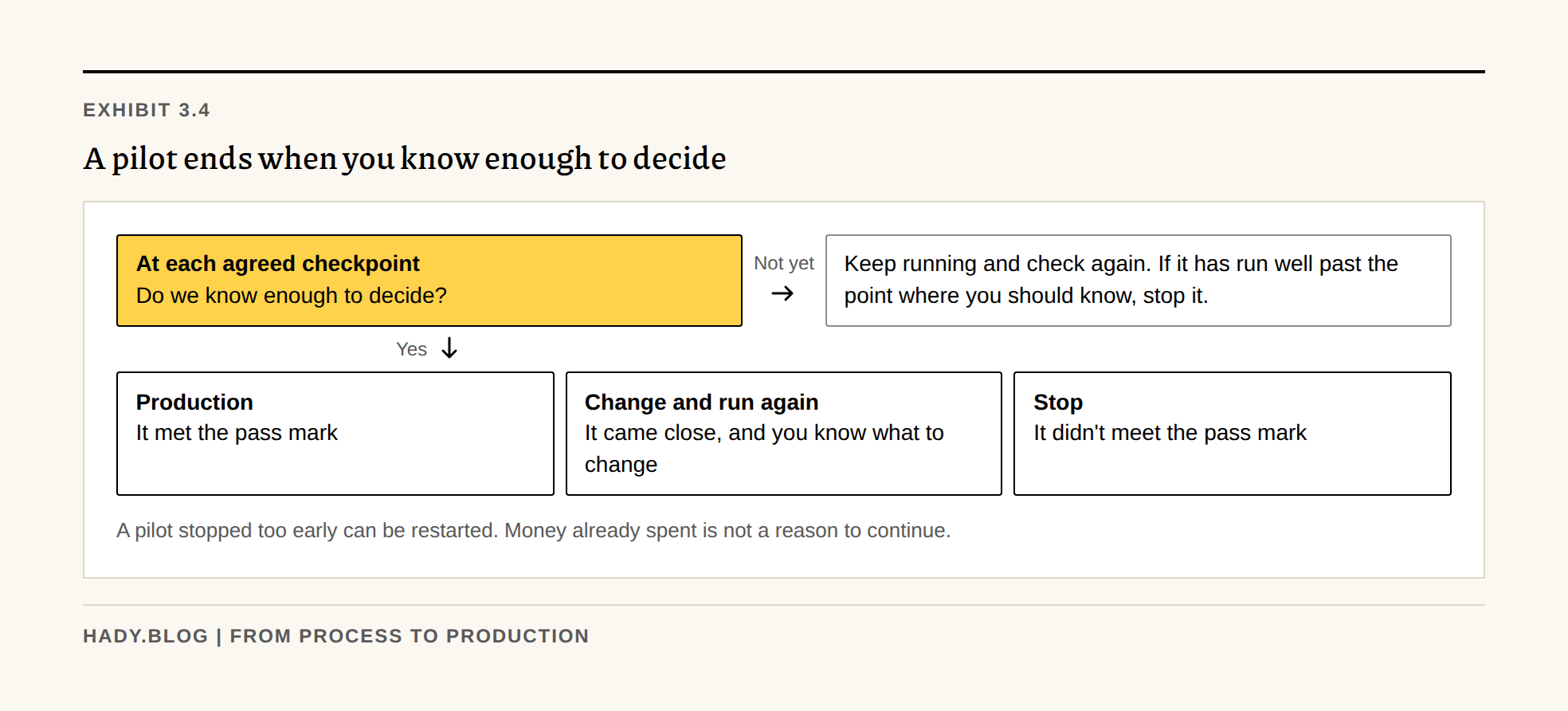
A pilot needs a clear end point, and that point is when you know enough to decide whether to develop it further. Write down what you need to know, and which results would lead to production, to changes or to stopping. Check at agreed points whether you have that information yet.
If you stopped too early, you can start the pilot again. If it has run well past the point where you should have known, stop it. The time and money already spent are not a reason to keep going. AI projects are especially prone to this, because there is always another model or another prompt that might fix the problem.
Exhibit 3.4
A pilot ends when you know enough to decide
Do we know enough to decide?
It met the pass mark
It came close, and you know what to change
It didn't meet the pass mark
A pilot stopped too early can be restarted. Money already spent is not a reason to continue.
Run it alongside the current process
Run the pilot alongside the existing process, with the people who will use the tool, as part of their normal work. Running both costs more for a while, but you get a direct comparison, and you can fall back on the existing process if the tool has problems.
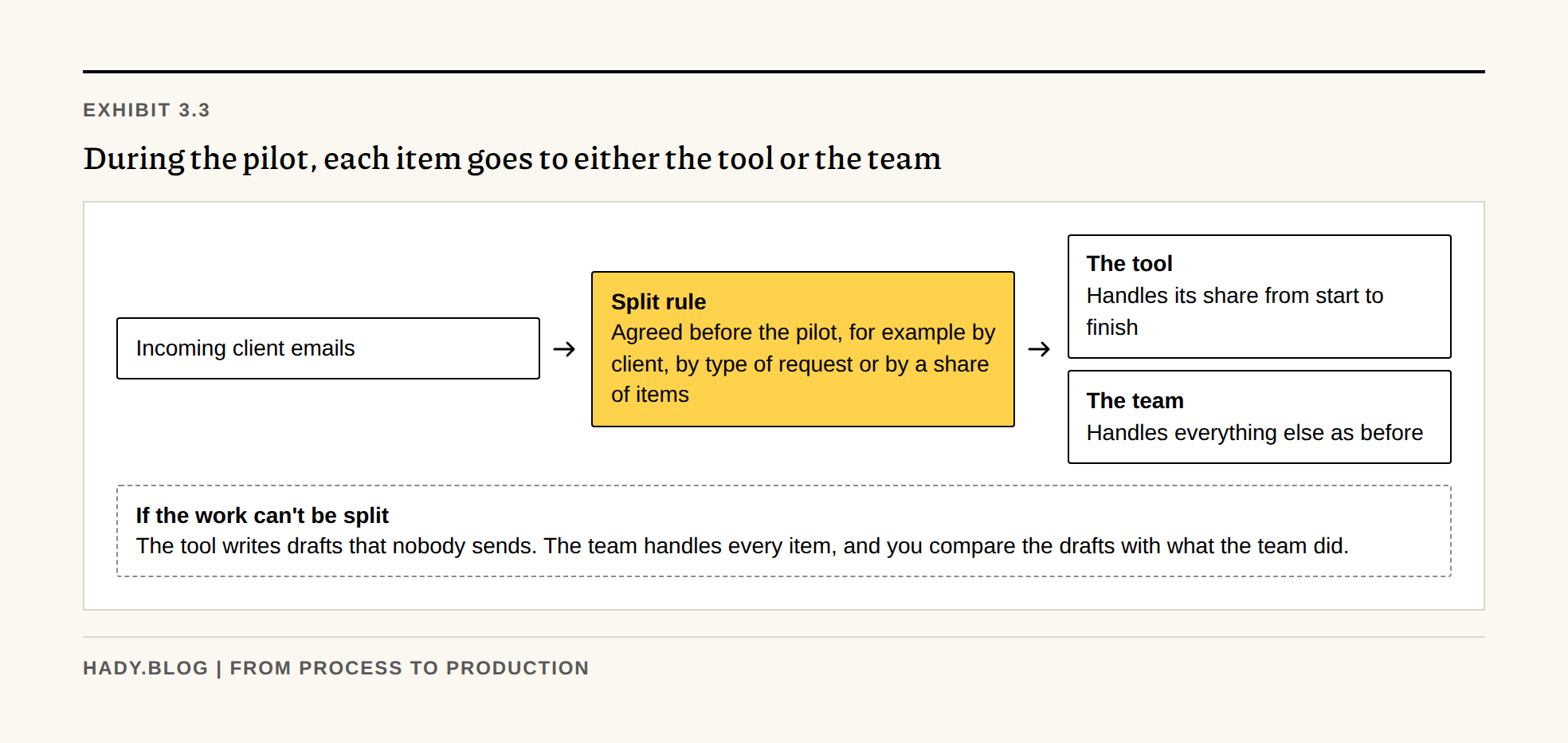
Each item has to be handled by one side only. If the AI answers a client email, nobody in the existing process should get the same email, and the other way round. Otherwise the client gets two answers and nobody knows which one counts. Decide before the pilot starts how items are split, for example by client, by type of request or by a share of incoming items.
If the work can't be split cleanly, have the tool produce drafts that nobody sends. People keep handling everything as before, and you compare the drafts with what they did.
Exhibit 3.3
During the pilot, each item goes to either the tool or the team
Agreed before the pilot, for example by client, by type of request or by a share of items
Handles its share from start to finish
Handles everything else as before
The tool writes drafts that nobody sends. The team handles every item, and you compare the drafts with what the team did.
Checklist before the pilot starts
Agree on each of these with the team that will run the tool.
Download the pilot agreement worksheet (PDF, two pages) to fill in with the people who sign it.
- Name the team that will run the tool in production, and agree with the infrastructure team where it will run.
- Get access to the data and systems the tool needs through security and compliance review, including sending data to the AI provider.
- Build a test set from the 20 outputs rated in part 1 and the difficult cases from part 2, and agree on a pass mark.
- Decide who reviews outputs, how errors are reported and fixed, and what the tool may not do without approval.
- Estimate the cost per item at full volume, including the time spent checking outputs.
- Decide how items are split between the tool and the current process, so that each one is handled once.
- Write down what you need to know to decide whether to continue, and which results lead to production, changes or stopping.
If the pilot meets its pass mark, the people who will run the tool need time and training to take it over. Part 4 covers that, and how to choose who leads this kind of work.